
WHAT IS BREVO ALL ABOUT
In today’s digital world, businesses need the right tools to reach customers, nurture leads, and increase sales. One of the most effective tools for small and medium businesses is Brevo (formerly Sendinblue). In this guide, we’ll break down exactly what Brevo is, how it works, and why it can be a game-changer for your business.
What is Brevo?
Brevo is an all-in-one digital marketing platform that helps businesses communicate with their audience and manage marketing campaigns. It’s especially popular for email marketing, but it also offers SMS marketing, automation, and CRM features.
Key Features of Brevo:
- Email Marketing – Design, send, and track email campaigns.
- Marketing Automation – Set automated workflows to nurture leads.
- SMS Marketing – Send promotional messages directly to mobile phones.
- Transactional Emails – Send order confirmations, receipts, or notifications.
- CRM (Customer Relationship Management) – Manage contacts and track customer interactions.
- Segmentation – Target your audience based on behavior, location, or interests.
- Analytics & Reporting – Track opens, clicks, and conversions to measure campaign performance.
Brevo is designed to be user-friendly, affordable, and scalable, making it perfect for small businesses or startups.
2. How Brevo Works
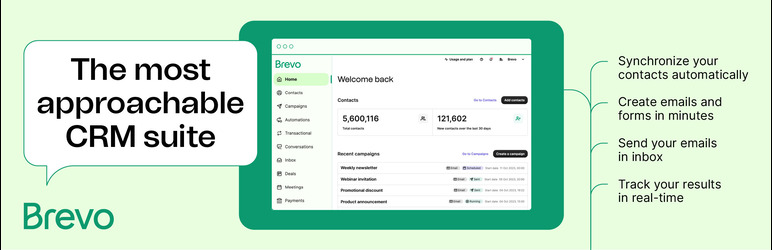
Brevo works by centralizing your marketing efforts into one platform. Here’s how it helps you reach and engage your audience:
- Collect Leads – Use signup forms, landing pages, or integrations to capture emails.
- Segment Your Audience – Organize contacts by interests, demographics, or purchase behavior.
- Send Campaigns – Create professional emails, SMS messages, or automated sequences.
- Automate Follow-Ups – Automatically nurture leads with welcome emails, reminders, or promotions.
- Analyze Performance – See how many people opened your emails, clicked links, or converted to customers.
How to Use Brevo
Using Brevo is simple, even for beginners. Here’s a step-by-step guide:
Step 1: Create an Account
- Go to Brevo.com
- Sign up using your email
- Choose a plan (there’s a free plan for beginners)
Step 2: Add Contacts
- Import your email list from a CSV file or manually
- Or create signup forms to capture new leads directly
Step 3: Segment Your Audience
- Divide your contacts based on interests, past purchases, or engagement
- Segmentation ensures your messages are relevant and increases conversion
Step 4: Create Email Campaigns
- Choose a template or design from scratch
- Add images, links, and CTAs (Call-to-Action)
- Personalize emails with subscriber names for better engagement
Step 5: Set Up Automation
- Automate welcome emails for new subscribers
- Send abandoned cart reminders for e-commerce
- Schedule follow-up emails to nurture leads
Step 6: Track Analytics
- Monitor open rates, clicks, and conversions
- Test different subject lines and content for better results
- Adjust campaigns based on performance data
How Brevo Can Help Your Business
Brevo can grow your business in multiple ways:
4.1 Build and Nurture an Email List
- Collect emails from website visitors or social media followers
- Keep your audience engaged with newsletters, offers, and updates
4.2 Increase Sales with Automated Campaigns
- Send timely emails to leads or customers
- Recover abandoned carts and upsell products automatically
4.3 Improve Customer Communication
- Send order confirmations, delivery notifications, or account updates
- Build trust and improve customer satisfaction
4.4 Cost-Effective Marketing
- Brevo’s free and affordable plans make it accessible for small businesses
- No need to spend thousands on ads to reach your audience
4.5 Data-Driven Decisions
- Analytics allow you to see what works and what doesn’t
- Optimize campaigns based on real performance data
Tips to Maximize Brevo for Your Business
- Use Personalization – Include subscriber names and targeted content.
- Segment Wisely – Don’t send the same email to everyone.
- Test Your Emails – A/B test subject lines, templates, and content.
- Automate Repetitive Tasks – Use workflows to save time and increase efficiency.
- Monitor Engagement – Focus on open rates, clicks, and conversions for improvement.
Why Brevo is a Great Choice for Small Businesses
- Affordable – Free plan for beginners, scalable pricing for growth.
- All-in-One – Email, SMS, CRM, and automation in one platform.
- Easy to Use – Beginner-friendly interface.
- Effective – Helps convert leads into paying customers.
Final idea and tips
Brevo is not just an email tool—it’s a complete digital marketing platform that helps businesses capture leads, nurture relationships, and increase sales. Whether you’re a startup or a growing business, Brevo can save you time, improve communication, and boost revenue.
Tip: Start with the free plan, focus on building your email list, set up automation, and watch how your business grows.